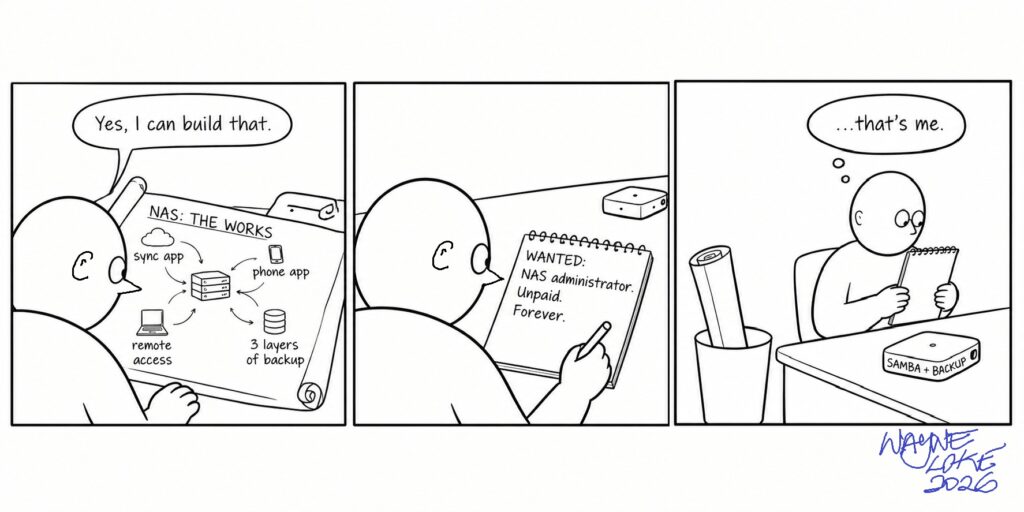
When I sat down to turn an old Mac Mini into my NAS, I asked Claude how to do it, and I gave it the kind of brief an old IT person gives. I wanted it to work like Dropbox, so I could reach my files from my phone or my laptop when I travel, with backups and the works, because I might need this or that one day. It came back with a runbook for Nextcloud: a web server, a database and a cache to run it, desktop clients that keep files on the NAS and fetch them when I open them, a phone app that uploads my camera roll, Tailscale so I could reach it all from outside the house, and three layers of backup starting with nightly snapshots. I read through it nodding along. Yes, I can build that. Okay, this looks good. Okay, this one works.
Then I put it away. Setting a design aside before committing to it was the right move when I was in IT, and it was the right move at home. While it sat there, one question kept coming back to me: would I hire someone to maintain what I built for myself?
The answer was no.
The reason I wanted a NAS at all is that nothing I keep on someone else’s platform is mine. I’m a renter on a plot of land, and the owner can decide to sell up or walk away, and there’s nothing I can do about it. My experience of the internet so far has been exactly that. Microsoft stopped selling Money in 2009 and switched off its online services in 2011. When LinkedIn was young you could list the books you’d read and write what you thought of them, through an Amazon reading list app; by 2012 it was gone, and everything written in it went too. That one pushed me into self-publishing on Strategic Kata, and this year Microsoft Whiteboard went the same way. So I unsubscribed and brought my files home from Google Drive and Dropbox, onto that Mac Mini, running Linux. OneDrive is still on my list.
Who keeps it running
Once the answer was no, every part of that runbook had only two possible keepers, automation or me. Read again with that in mind, it looked like a full-time job just to maintain what I said I wanted. The runbook’s own section on upkeep was headed “Ongoing maintenance (light)”, and under it sat Nextcloud updates, major version upgrades a couple of times a year taken one version at a time, operating system updates, a monthly health check on 14-year-old disks, and a test restore every quarter. Every piece that let me reach my files from anywhere was a piece to be patched, watched, renewed and fixed when it broke, and the only name on the support roster was mine.
I didn’t take the runbook’s word for “light”, so I researched Nextcloud on my own first, without the AI. The Nextcloud website is impressive and helpful with whatever information you need, and it’s written by the people who make it, which is why I went looking for real user experience: Reddit, StackExchange, and the feedback of people actually running it at home. Then I asked Grok to summarise what users criticise about Nextcloud as a home NAS, and compared its summary with what I’d found myself. Two of the criticisms it gathered were that updates regularly break installs, and that the slowness people complain about shows most on home hardware: older machines, hard drives, modest memory. Mine is a 14-year-old Mac Mini with 8 GB of RAM. The same summary noted that plenty of people run Nextcloud happily for years on carefully tuned setups. I never installed it to find out which group I’d be in.
The reading sent me back to Claude with a question: “It sounds so simple, but is it really easy to maintain after the setup? As you already know, I want to keep things simple and relatively cheap. Are you over-simplifying or complicating my intention?” Its reply began: “Honest answer: I was leaning to the heavy end, and you’re right to poke at it.” Nextcloud was off the list after that.
I know where my half of that comes from. After enough years in IT, I read a design by asking whether it can be built, and I can build most things, so the answer is usually yes. My goals tend to be big and my builds tend to be over-engineered, because I want all the works in case I need them. In an organisation, whatever goes live has a team behind it, a support roster and a budget line, so somebody is always carrying the upkeep. At home I have to ask a second question, who keeps it running, because the answer is always me, and my time is what I retired to have.
The ambition in the brief was mine, the heavy lean in the answer was Claude’s, and the upkeep only got priced when I went looking for it myself. The AI doesn’t come free either. The free trial versions run out of depth or rounds in a day, and if I want an agent working on my behalf, I pay for it from my own account, because I’m not a business and this is my own consumption. So even the upkeep I hand to a robot has a price, and I have to pick the plan I can afford.
Then I went back to first principles and asked how I actually live. How often do I travel and need something that only exists on the NAS? How often, out and about, have I wanted a file from home? When I counted honestly the answer was never, and it had never occurred to me to ask. It’s the same question I’d put to anyone about their email: when did you last open something you wrote six months ago? Hardly ever.
Getting to plain still took a detour. Cockpit, a web console for running the server from a browser, and XRDP, so I could open a remote desktop on it, were afterthoughts about having a screen to look at, and even those were cumbersome. The terminal and the command line are the best tools for the job. In the end I rebuilt the Mac Mini from scratch, purged Cockpit, and kept to Samba file shares and a standard Borg backup. Live work stays on the laptop, and a RoboCopy script pushes copies across to the NAS, copy only, so it never deletes anything on the other side; I run it as a dry run first to see what it’s about to do. There’s no sync app on my phone, and the NAS has no door to the internet. That’s all it does.
The builds I kept
The NAS isn’t the only thing I’ve built since I stopped working. There’s a macro early-warning dashboard, an unemployment monitor, a month-end close that turns my home accounts into balances and reports, a task tracker for the body corporate, a weekly scheduler, a fitness and health tracker, and most recently Not a Fishbowl, a systems model of how the world flows into New Zealand. At the start every one of them looked over-engineered too. They’ve been getting simpler as I use them, because using them tells me what I want from them and what matters.
So why do these pass the hiring question when the NAS design failed it? I use them. They hang together around something that has always been on my mind, keeping watch on the financial and economic conditions my retirement runs in, and each one feeds the others. The dashboards and the model tell me what’s moving out there, the month-end close tells me where I stand, and between them they shape how I manage the rest of life. Each gets better the more I use it.
The upkeep is real, though, because the world these builds measure keeps moving, and some of what I track goes out of date fast. Look at what oil and interest rates have done lately, before you even get to inflation.
What the upkeep looks like
Not a Fishbowl is where I learnt what upkeep costs. The model needs readings to say which of its loops are gaining and which are fading, and the readings live on other people’s websites, on other people’s terms. Some sit behind a login: the Institute for Supply Management wants you signed in on its own site, so I read its releases on PR Newswire instead. Some refuse a script outright: the Reserve Bank’s page for the Official Cash Rate turns away an automated request, so I read it in a browser and type the number in. Some update weeks or months late: the series I use for foreign holdings of US Treasuries was still sitting at January when the model refreshed this week. And the free history of the gold price I first relied on has gone altogether.
So I fell back on manual data entry, which is tedious, and this week it turned out to be worse than tedious. The NZ 2-year swap rate I’d been typing in by hand read as steady, up 0.08 of a point since my previous entry, when over the 91 days the model is meant to look across it had risen 0.45, from 3.62% on 20 July to 4.07% on 19 October. The model was comparing my last two entries and missing the quarter.
The easy fix is to register for API access, create logins, or pay for subscriptions, and each of those hands me another job: keeping track of keys and passwords, renewing them, and keeping them out of my backups. The work became researching smarter. Look for the same number published somewhere else. FRED, the St Louis Fed’s database, gives most of its series away as plain files with no key at all. The swap rate now comes straight from the chart data behind interest.co.nz, daily since 2007. And before I trust a new source, I test it backwards against the quarter I already have. When I moved the NZ 10-year yield onto daily figures, I checked that its July, August and September averages matched the monthly numbers I’d been using, 4.62%, 4.71% and 4.95%, before I let it replace them. The daily figures also showed that New Zealand took 75-78% of the rise in the US 10-year between July and mid-October, not the 70% or so I’d published in the launch article, so the article now carries a correction.
After a few rounds of that kind of trial and error the readings get better, and the model’s call on each loop gets more accurate. It looks impressive, and there’s still work to do on better sources. This is where AI comes in, because I can’t do it alone, and a model with 34 loops needs automation to stay honest. Every Monday morning a scheduled Claude task runs the refresh, checks which loops changed status, and tells me which readings have gone stale. For this one build, I answered yes to the hiring question. I hired a robot, and I pay its wages out of my own account.
This Monday’s refresh ran at 8:57. No loop changed, nothing was due for testing, and four readings were stale.
It’s worked for me.